blog
B2B Product Demo Video: How to Explain Complex Products Clearly
Your product might be brilliant, but if buyers can’t understand it in a couple of minutes, they will move on. The risk is real.
Complexity is a significant deterrent to B2B product purchases, so how do you effectively and persuasively describe complex SaaS products?
According to Wyzowl’s 2026 Video Marketing Statistics, 91% of businesses use video as a marketing tool, while 96% of people surveyed have watched an explainer video to learn about a product or service.
These findings highlight why clear product demonstrations matter for B2B marketing and sales.
This guide shows you how to plan, script, and produce a demo video that explains complexity clearly, so prospects understand your value and take the next step.
What Is a B2B Product Demo Video?
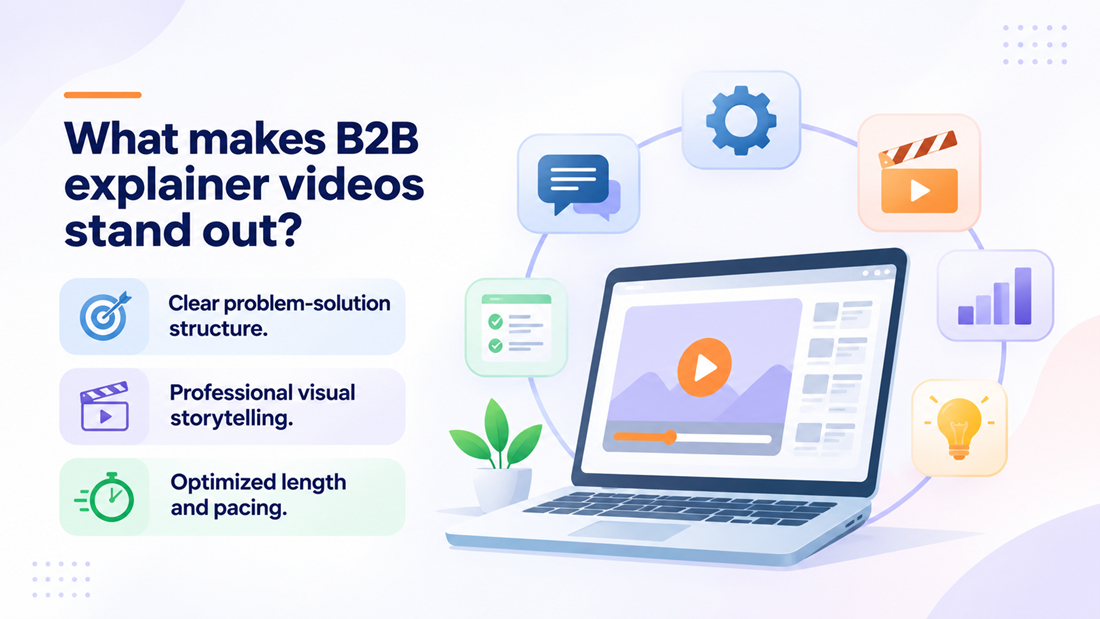
A B2B product demo video is a short, focused video that shows business buyers how a product works, what problems it solves, and why it may fit their needs. It can feature a live software demonstration, screen recordings, animation, product footage, or a combination of these formats.
Unlike a general brand video, a product demo focuses on practical use. It helps buyers understand how a product fits into their daily work and supports their business goals.
For example, a company selling enterprise software might demonstrate how its platform collects sales data, identifies trends, and creates reports. Instead of listing every technical feature, the video follows a simple workflow that viewers can understand.
A strong B2B product demo answers three essential questions:
- What does the product do?
- How does it solve a specific business problem?
- What makes it useful for the intended buyer?
These answers help prospects evaluate a product before requesting a sales meeting or technical consultation.
Why Do Complex Products Need Demo Videos?
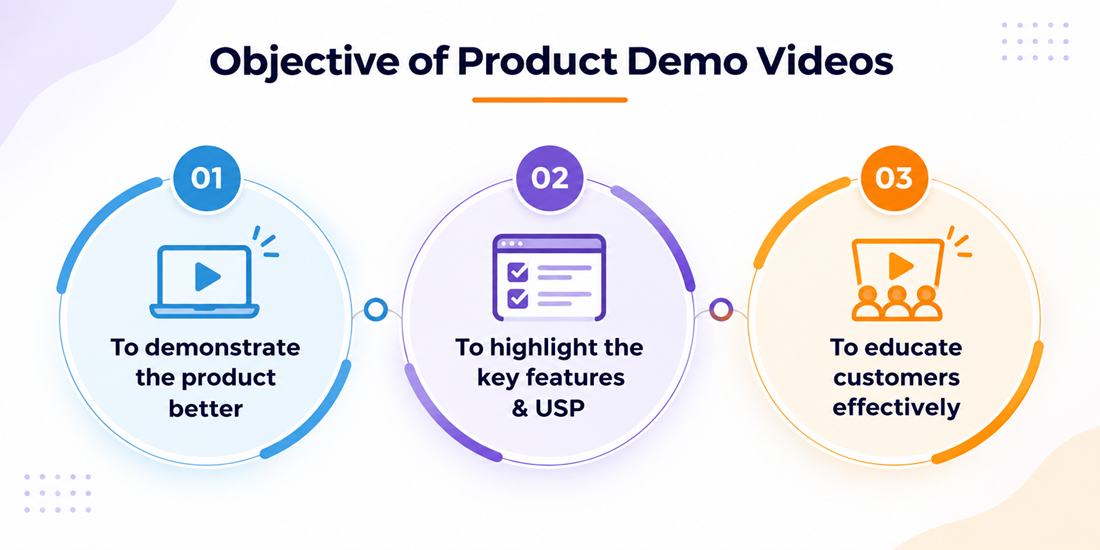
Complex products need demo videos because buyers research on their own, and video is the fastest way to understand something complicated. A good demo builds understanding and influences shortlists before sales ever get involved.
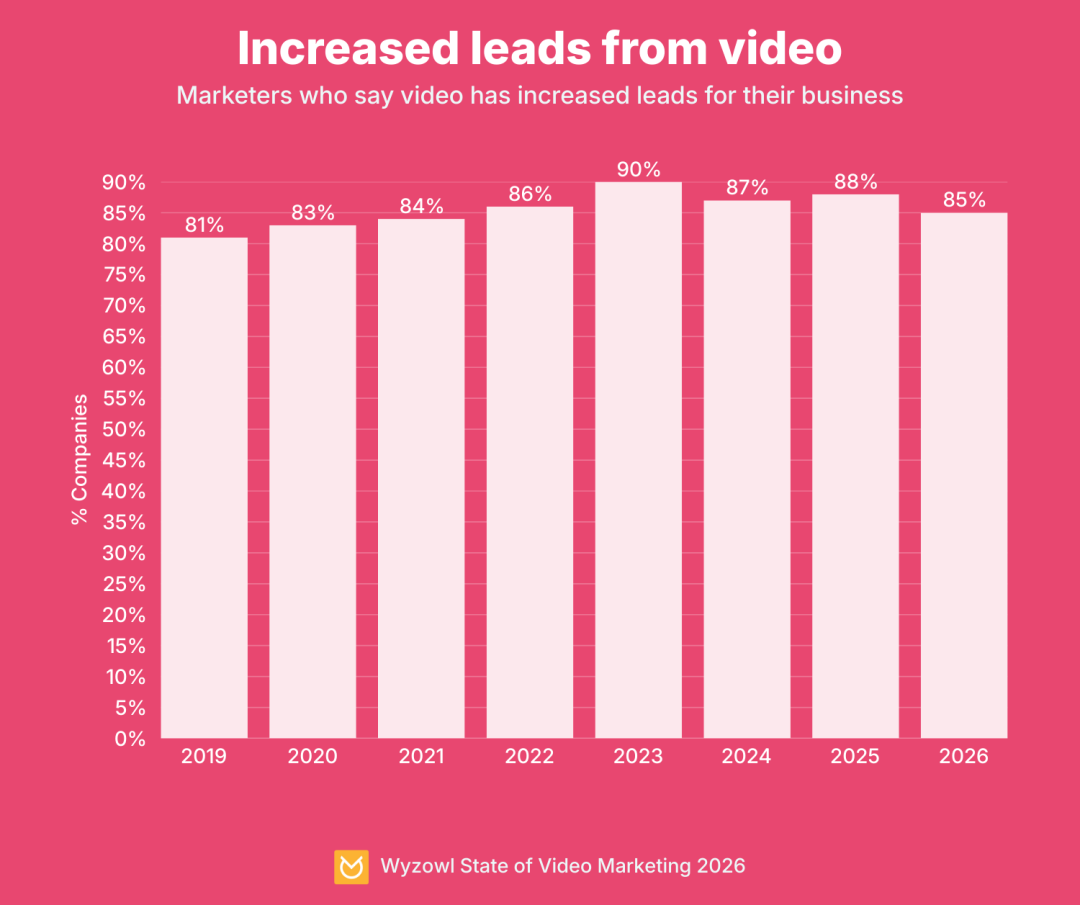
Wyzowl’s 2026 research reports that 85% of video marketers say video has helped them generate leads, and 83% say it has directly increased sales.
Source: Wyzowl
Do B2B Buyers Research Before Talking to Sales?
Yes. Most buyers form opinions long before a sales call, and many prefer to avoid reps entirely. Your demo video is often the first real “conversation” they have with your product. That makes clarity a business issue. A confusing video quietly removes you from the shortlist, and you never hear about it.
Does Video Help Buyers Understand Products Better?
Yes, and the data is consistent. Wyzowl’s 2026 data shows 63% of people prefer a short video when learning about a product, far ahead of articles at 12% and sales calls at 5%.
The payoff is comprehension. 96% of video marketers say video has helped increase user understanding of their product or service. For products with many moving parts, that gain matters most.
Do Demo Videos Influence Purchase Decisions?
Yes. Product demo videos help buyers understand how a product works, its features, and the value it offers. Seeing the product in action builds confidence and helps buyers make informed purchase decisions.
How Do You Explain a Complex Product Clearly in a Demo Video?
The most effective approach is to start with a business problem, demonstrate a practical solution, and explain the value in simple language. The video should help viewers understand one clear use case rather than trying to cover every product capability at once.
1. Identify the target audience and its main problem
Before writing the script, define who will watch the video. A chief technology officer may care about security, scalability, and integration. A sales manager may focus on team productivity, reporting, and pipeline visibility. The same product can address different needs, so the video should reflect the intended viewer.
Ask these questions during planning:
- Who is the primary buyer?
- What problem are they trying to solve?
- What do they already know about the product category?
- What concerns could prevent them from considering a purchase?
- What action should they take after watching?
For example, a workforce management platform could target HR leaders who struggle with manual scheduling. Its demo should show how the platform creates schedules, identifies staffing gaps, and helps managers adjust shifts.
This approach makes the demonstration relevant from the start.
2. Focus on one core use case
Trying to explain every feature in a single video can confuse viewers. Instead, select one common problem and demonstrate how the product solves it from beginning to end.
A cloud accounting platform, for instance, might focus on the process of importing transactions, categorizing expenses, and generating a financial report. Additional features can appear in separate videos.
A useful rule is to give each video one primary purpose. If the product serves different audiences or workflows, create a short series of focused demonstrations instead of one long overview.
3. Translate technical features into business benefits
Features explain what a product can do. Benefits explain why that capability matters to the buyer. A clear demo connects both.
Consider these examples:
| Technical feature | Clear business benefit |
| Automated data synchronization | Reduces manual data entry between connected systems |
| Role-based access controls | Helps administrators manage who can view or change information |
| Predictive sales analytics | Helps teams identify potential sales trends |
| Workflow automation | Reduces repetitive steps in routine processes |
| Centralized reporting | Gives teams a shared view of important business metrics |
These benefits should match the product’s verified capabilities. Avoid claiming that a feature guarantees higher revenue, eliminates all errors, or ensures complete security unless reliable evidence supports the claim.
4. Build the story around a real workflow
A product demo becomes easier to follow when viewers see a process unfold in a logical order.
For example, a B2B inventory management video could show a warehouse manager checking stock levels, identifying a low-stock item, and reviewing a reorder recommendation.
Each scene should answer a simple question: What is happening, why does it matter, and what happens next? This workflow-based structure helps buyers understand how the product fits into an actual workday rather than viewing a collection of unrelated screens.
5. Use simple language without losing accuracy
Avoid filling the script with acronyms, technical terms, and lengthy explanations. If a technical term is necessary, explain it briefly the first time it appears.
For example, instead of saying, “The platform uses role-based access control to manage authorization across distributed environments,” say, “The platform lets administrators control which users can access specific information.”
The second version is easier to understand while preserving the main point. Technical buyers can still receive detailed specifications through supporting documentation or a deeper technical demo.
6. Show the product in action
A B2B product demo should provide visible evidence of how the product works. Use screen recordings, interface walkthroughs, product footage, or animation to make important processes clear.
Keep the viewer’s attention on the relevant action. Highlight the button being selected, the report being generated, or the workflow being completed.
For software products, remove distracting notifications, unnecessary browser tabs, and irrelevant interface elements before recording. Use realistic sample data and avoid displaying confidential customer information.
The visual demonstration should support the narration, not compete with it.
What Is the Best Structure for a B2B Product Demo Video?
A practical structure moves from the buyer’s problem to the product’s solution, then ends with a clear next step. The exact length depends on the product, audience, and purpose of the video.
Start with the problem
Open with a specific challenge the target audience recognizes. Avoid long company introductions or generic claims about innovation.
For example, a data analytics company could begin with a marketing team struggling to combine reports from several platforms. This immediately establishes why the demonstration matters.
Demonstrate the solution step by step
Show the product addressing the problem in a logical sequence. Explain only the details needed to understand the workflow. Use on-screen labels, close-up views, cursor highlights, and simple animations when they improve comprehension. If a process includes several stages, introduce them one at a time.
Connect the result to business value
Explain what the completed workflow helps the user accomplish. This might include easier reporting, clearer visibility, fewer manual steps, or more consistent processes.
Use real product data or documented customer results when available. If a result is illustrative rather than measured, identify it as an example instead of presenting it as a proven outcome.
End with one clear call to action
Tell viewers what to do next. Depending on their stage in the buying process, the next step could be booking a personalized demo, exploring a product page, downloading a technical guide, or speaking with a specialist.
Avoid presenting too many competing actions. One relevant CTA makes the next step easier to understand.
Which Video Format Works Best for Complex B2B Products?
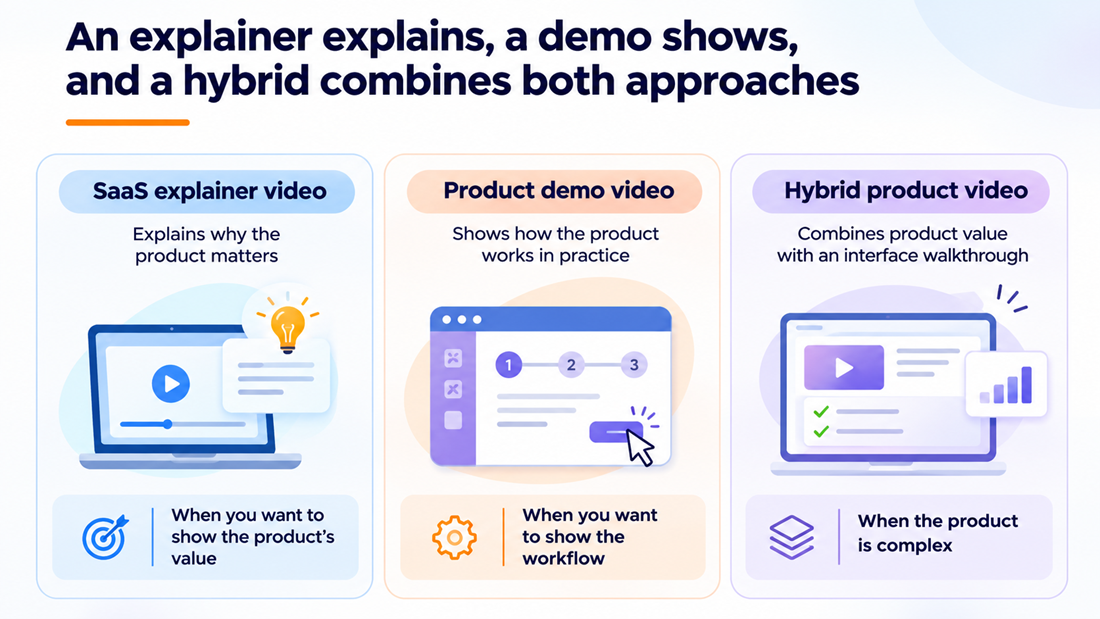
The best format depends on what buyers need to see and how much technical detail the product requires. Some products benefit from a direct screen recording, while others need animation or a combination of formats.
Screen-recorded software demos
Screen recordings work well for SaaS platforms, CRM tools, analytics software, and workflow applications. They show the real interface and allow viewers to follow a process as it happens.
Use them when interface usability, navigation, and practical workflows are central to the buying decision. Keep the recording focused and add narration or captions to explain important actions.
Animated explainer videos
Animation works well when a product involves invisible processes, complex data flows, or abstract technical concepts.
For example, a cloud infrastructure provider can use animation to explain how data moves between services. A cybersecurity company can illustrate how suspicious activity triggers an alert.
Animation should simplify the explanation without misrepresenting how the product operates.
Live-action product demonstrations
Live-action footage can help demonstrate physical equipment, industrial machinery, laboratory instruments, and other tangible products.
A manufacturer could show how an automated inspection system scans a component and flags a defect. Close-up shots and clear narration can make the process easier to understand.
Hybrid product demos
A hybrid video combines screen recordings, animation, live footage, and on-screen text. This format is useful when the product has both a visible interface and complex underlying technology.
For example, an enterprise software demo might begin with an animated overview of a data workflow, move into the actual platform, and finish with a real-world business use case.
| Visual Type | Best For | Watch Out For |
| Screen recording | Live workflow end-to-end | Notifications, cursor drift, slow loads |
| Annotated screenshots | Precise pacing and zoom | Static feel without narration |
| Stock footage | Problem setup and human context | Generic clips that mismatch your audience |
| Animation | Invisible or backend processes | Overcomplicating what you could just show |
How Long Should a B2B Product Demo Video Be?
A B2B product demo video should be long enough to explain the product clearly while keeping viewers engaged. A short overview may take 60–120 seconds, while a detailed workflow demonstration may require three to five minutes or longer.
Match Video Length to Buyer Intent
Create different videos for different stages of the buyer journey:
- Awareness: Introduce the product and its main benefits.
- Consideration: Demonstrate key features and workflows.
- Decision: Explain integrations, requirements, and limitations.
- Onboarding: Provide step-by-step instructions.
Remove Unnecessary Content
Avoid lengthy introductions, repeated claims, and irrelevant features. Keep each scene focused on the viewer’s needs. Prioritize clarity over a fixed runtime.
How Do You Measure the Success of a B2B Product Demo Video?
Measure a B2B product demo video by tracking engagement, lead generation, and sales outcomes. The right metrics depend on whether the video aims to attract visitors, educate prospects, or support purchasing decisions.
Track Engagement and Viewing Behavior
Monitor key metrics such as:
- Play rate: The percentage of page visitors who start the video.
- Watch time: How long viewers watch.
- Completion rate: The percentage of viewers who finish the video.
- Audience retention: Where viewers lose interest or skip sections.
These insights help identify areas that need improvement.
Measure Leads and Sales Outcomes
Track demo requests, form submissions, qualified leads, and sales conversations influenced by the video. Review CRM data to understand its role in the buyer journey.
Improve Based on Feedback
Use analytics and sales team feedback to refine the script, visuals, and opening. Test changes and compare results over time.
Conclusion
A successful B2B product demo video explains complex features through clear language, relevant visuals, and real-world use cases. Focus on your audience’s needs, demonstrate one key workflow, and connect product capabilities to business goals. Optimize the video for SEO, add a transcript, and track engagement and qualified leads to measure results.
Looking to explain your product more clearly? Explore Tangence’s video production services to discuss demo videos, explainers, animation, and editing for your marketing and sales goals.
FAQs:
1. What is the main purpose of a B2B product demo video?
The main purpose is to show business buyers how a product works, which problems it solves, and how it fits their needs. A good demo uses a clear workflow and practical examples to help viewers evaluate the product.
2. How long should a B2B product demo video be?
A short product overview may take 60–120 seconds, while a detailed workflow demonstration may require three to five minutes or more. The ideal length depends on product complexity, audience knowledge, and the video’s purpose.
3. What should a B2B product demo video include?
A B2B product demo should include the target buyer’s problem, a focused product walkthrough, an explanation of relevant business benefits, supporting evidence where available, and one clear call to action.
4. How do product demo videos support SEO and AI search?
Product demo videos can support SEO when they appear on relevant, crawlable webpages with descriptive titles, accurate descriptions, transcripts, and appropriate technical implementation. Clear supporting content can also help answer engines interpret the product’s purpose and use cases, but it cannot guarantee AI citations.
5. How can Tangence help with B2B product demo videos?
Tangence offers video and motion graphics services, including demos and explainers, custom animations, editing, training videos, and customer testimonials. Businesses can explore these services to discuss ways to explain complex products through visual storytelling.
6. Does Tangence provide animation for complex product explanations?
Yes. Tangence lists custom animations among its video services. Animation can help explain abstract processes, technical workflows, and product concepts that are difficult to capture with screen recordings or live-action footage alone.
7. How can businesses contact Tangence about video production?
Businesses can visit the official Tangence video services page to review its services and use the contact options provided there to discuss project requirements, production scope, and next steps.